Photographers usually find clients in one of two ways: they actively chase attention through social media, referrals, directories, and paid ads, or potential clients discover them while searching for a photographer.
SEO supports the second path. When someone searches for “wedding photographer in Asheville,” “newborn photographer near me,” or “corporate headshots Chicago,” search engine optimization helps your website appear when they are already looking for the service you provide.
Unlike an advertisement that stops producing traffic when the budget ends, a well-optimized page can continue attracting inquiries for months or years. SEO takes time to build, but it can become a reliable source of qualified leads that supports your business while you focus on shooting, editing, and serving clients.
This guide explains the foundations of photographer SEO and provides an eight-step strategy covering local visibility, technical improvements, keyword research, page optimization, content creation, link building, and performance tracking. The principles apply to wedding, elopement, portrait, family, newborn, maternity, boudoir, senior, branding, product, real estate, and event photographers.
Part 1: SEO Foundations
Before changing titles, publishing blog posts, or building links, it helps to understand what SEO is designed to achieve. These foundations make it easier to evaluate which tactics are useful and which are unnecessary.
What Is SEO for Photographers?
Search engine optimization is the process of improving your website so it can appear more prominently in unpaid search results for relevant queries.
For photographers, the most valuable searches usually combine a service, niche, location, venue, or client question, such as:
- Denver family photographer
- Boudoir photographer in Nashville
- Corporate headshots Chicago
- How much does wedding photography cost?
- Best places to elope in Iceland
SEO helps Google understand what you offer, where you work, and which questions your website answers. When those signals match what a potential client is searching for, your pages are more likely to appear in the search results.
Learn more about our white-label local SEO services.
This makes SEO different from interruption-based advertising. A social media ad is shown to someone while they are doing something else. A search result appears after the person has actively expressed a need. That usually makes search visitors more qualified and more likely to take action.
SEO vs. Google Ads vs. Social Media
SEO, paid search, and social media can all generate clients, but they work in different ways.
| Channel | Main Strength | Main Limitation | Best Use |
| SEO | Builds long-term organic visibility | Usually takes several months to gain momentum | Consistent inquiries from people actively searching |
| Google Ads | Can generate immediate search visibility | Traffic stops when spending stops | Fast lead generation and testing offers |
| Social media | Displays your work and builds familiarity | Reach depends heavily on platform algorithms | Brand awareness, engagement, and referrals |
| Directories | Provides access to an established audience | You compete beside many similar providers | Additional exposure and referral traffic |
Google Ads and SEO may appear on the same search results page, but they are separate systems. Paying for ads does not improve organic rankings.
Social platforms remain valuable for showing your portfolio, building relationships, and staying visible. However, posts usually have a short lifespan, and you do not control the platform or its algorithm. Your website is an asset you own, making it a stronger foundation for long-term marketing.
The most practical strategy is often a combination: use social media to display your work, paid ads when immediate visibility is needed, and SEO to build a sustainable source of inquiries.
How SEO Supports the Client Journey
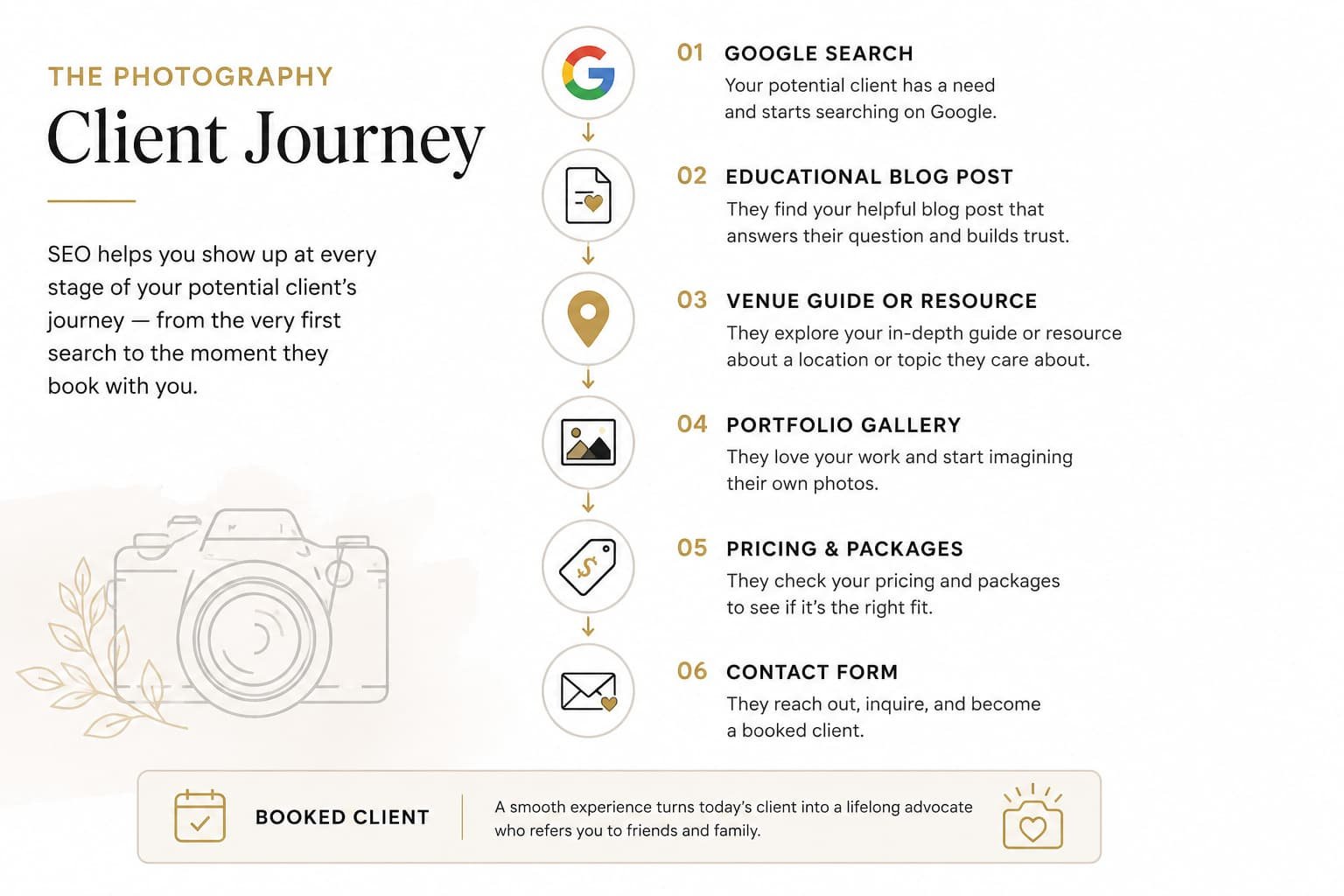
Most clients research extensively before contacting a photographer. They compare styles, prices, locations, reviews, packages, and approaches long before submitting an inquiry.
SEO helps your website appear at different stages of that research.
| Client Stage | Example Search | Suitable Content |
| Early research | Best places to elope in Colorado | Location or inspiration guide |
| Planning | When should I book newborn photos? | Educational blog post |
| Comparing | Documentary vs. traditional wedding photography | Comparison guide |
| Ready to book | Portland documentary wedding photographer | Service or landing page |
A person may first discover you through a planning guide, return later to view your portfolio, and eventually reach your pricing or contact page. Useful content builds familiarity before the inquiry happens.
This is why a photographer’s website should be more than an online portfolio. It should also answer the practical questions clients ask while choosing whom to hire.
How Google Finds and Ranks Pages
Google processes web pages in three main stages:
- Crawling. Googlebot follows links and discovers new or updated pages. An XML sitemap helps search engines locate important URLs more efficiently.
- Indexing. Google analyzes a page and may store it in its search index. A page that is not indexed cannot appear in organic search results.
- Ranking. When someone searches, Google evaluates relevant indexed pages and orders them according to how well they appear to satisfy the query.
Your website must therefore be:
- accessible to search engine crawlers;
- clear enough for Google to understand;
- useful and trustworthy enough to compete with other results.
The rest of this guide addresses all three requirements.
The Three Foundations of Photographer SEO
Google uses many systems and signals, but most practical SEO work strengthens one of three areas: relevance, authority, or website experience.
Relevance
Relevance describes how closely a page matches what the searcher wants.
Keywords help establish relevance, but modern search engines do not rely only on exact phrases. They also evaluate related concepts, context, and topic coverage.
For example, a useful page about Yosemite elopements might naturally cover:
- permits;
- ceremony locations;
- seasonal conditions;
- travel and parking;
- guest limits;
- photography timelines;
- what couples should bring.
This is more valuable than repeating “Yosemite elopement photographer” throughout a thin service page.
Compare the following homepage headings:
| Weak | Clearer and More Relevant |
| Capturing Life’s Most Beautiful Moments | Asheville Wedding Photographer for Intimate and Outdoor Celebrations |
The first may sound appealing, but it gives Google and visitors little information. The second clearly identifies the service, location, and type of client.
Authority
Authority reflects whether Google and potential clients can trust your website as a reliable source.
Google’s quality guidance uses the concept of E-E-A-T:
- Experience
- Expertise
- Authoritativeness
- Trustworthiness
Photographers have a natural advantage because they can demonstrate first-hand experience. Original photographs, venue-specific advice, real client examples, detailed processes, reviews, and professional credentials provide signals that generic content cannot easily reproduce.
Authority can be strengthened through:
- in-depth content covering your specialist topics;
- links from venues, vendors, publications, and local organizations;
- a complete Google Business Profile;
- consistent business information;
- genuine client reviews;
- clear information about who created the content and why they are qualified.
A venue guide written by a photographer who has worked there repeatedly is more credible than a generic article assembled from second-hand information. Include practical details that only someone with real experience would know.
Website Experience
Your pages must also be easy to use. A relevant and authoritative page can still underperform if it loads slowly, is difficult to navigate, or works poorly on mobile devices.
For photography websites, the most common challenges are:
- oversized images;
- heavy sliders and background videos;
- slow mobile performance;
- unclear navigation;
- portfolio pages with little explanatory text;
- contact forms that are difficult to complete on a phone.
Google evaluates technical page experience using signals such as mobile usability and Core Web Vitals. More importantly, slow or confusing pages reduce the likelihood that a visitor will explore your portfolio or submit an inquiry.
Behavioral metrics such as bounce rate and dwell time should not be treated as simple direct ranking factors. However, they can still help you determine whether a page meets visitors’ expectations. A page that attracts clicks but quickly loses users may have a problem with speed, intent, layout, or content.
For photographers, improving the website experience usually begins with two priorities: optimizing image delivery and testing every important page on a mobile device.
These three foundations provide a practical way to evaluate every SEO action:
- Relevance: Does the page match what the client searched for?
- Authority: Does it demonstrate genuine experience and earn trust?
- Experience: Is it fast, clear, and easy to use?
The eight-step strategy in the next section applies these principles to your website, content, local presence, and ongoing SEO work.
Part 2: The 8-Step SEO Strategy for Photographers
The foundations explain how search works. The next eight steps show how to build a website that attracts qualified traffic and converts visitors into inquiries. Follow them in order, as each step supports the next.
Step 1: Set Up Google Business Profile and Google Search Console
Before optimizing pages or writing content, set up the two Google tools that provide local visibility and reliable SEO data.
Google Business Profile
Google Business Profile controls how your business appears in Google Maps and the local results shown for searches such as “wedding photographer near me” or “family photographer in Denver.”
For photographers serving a local area, this is often one of the fastest ways to improve online visibility.
When creating or optimizing your profile, complete all required fields.
| Element | Best Practice |
| Primary category | Select the most accurate category, such as Wedding Photographer or Portrait Photographer. |
| Secondary categories | Add additional photography services where appropriate. |
| Service area | Define the cities or regions you serve if you work on location. |
| Business description | Describe your specialties naturally without keyword stuffing. |
| Photos | Upload portfolio images, logo, and cover photo. Add new work regularly. |
| Website | Link to your primary website rather than a social profile. |
| Reviews | Request reviews from satisfied clients and reply to every review. |
Google now commonly verifies businesses through video verification instead of postcards. Complete whichever verification method Google requests.
Reviews deserve special attention. They improve trust with prospective clients while also strengthening local SEO signals. Instead of asking only occasionally, build review requests into your post-delivery workflow after every successful session.
Example:
After delivering a gallery, send a short follow-up email to thank the client and include a direct Google review link. Consistent review growth is generally more valuable than receiving many reviews in a short period, then none for months.
Google Business Profile also allows you to publish updates, promotions, and announcements. Although these posts are not a major ranking factor, they demonstrate that the business is active and give visitors another reason to engage with your profile.
Google Search Console
Google Search Console is the most important free SEO tool available. It shows how Google sees your website and provides data directly from Google rather than third-party estimates.
Search Console reports:
- the search queries generating impressions and clicks;
- average rankings;
- which pages receive organic traffic;
- indexing problems;
- technical issues affecting search visibility.
After verifying ownership, complete these two tasks immediately:
- Submit your XML sitemap.
- Review the Performance report regularly.
Most WordPress SEO plugins automatically generate a sitemap at a URL such as:
yourdomain.com/sitemap.xml
or
yourdomain.com/sitemap_index.xml
Example:
If Search Console shows that your page about newborn photography receives thousands of impressions but very few clicks, the page may need a stronger title tag or meta description rather than additional backlinks.
Search Console helps identify these opportunities without guesswork.
If you expect traffic from Microsoft Bing or AI-powered search experiences, it is also worth connecting your site to Bing Webmaster Tools, which can import data from Search Console in just a few minutes.
Once these tools are configured, you can measure real progress instead of relying on assumptions.
Step 2: Remove the SEO Problems Holding Your Site Back
Many photographer websites already contain technical or content issues that reduce their ability to rank. Fixing these problems often produces noticeable improvements before publishing any new content.
The two most common issues are keyword cannibalization and thin content.
Keyword Cannibalization
Keyword cannibalization occurs when several pages target the same search query.
This is particularly common on photography websites because every session or wedding receives its own blog post with nearly identical optimization.
For example:
| Competing Pages |
| Mountain Wedding in Colorado |
| Colorado Mountain Wedding |
| Beautiful Mountain Wedding Photography |
| Adventure Mountain Wedding |
If all four pages try to rank for “Colorado wedding photographer,” Google may struggle to determine which page deserves the strongest visibility.
A better approach is:
- one primary service page targeting the core keyword;
- individual blog posts optimized for specific venues, locations, seasons, or stories.
For example:
| Page | Primary Keyword |
| Colorado Wedding Photographer | Colorado wedding photographer |
| Garden of the Gods Wedding | Garden of the Gods wedding |
| Breckenridge Winter Wedding | Breckenridge winter wedding photographer |
| Rocky Mountain Elopement Guide | Rocky Mountain elopement guide |
Each page has a unique purpose, reducing competition within your own website.
Search Console often reveals cannibalization when multiple URLs receive impressions for the same keyword.
Thin and Low-Value Content
The second common problem is low-value content that provides little benefit to visitors or search engines.
Examples include:
- tag archive pages;
- category archives with almost no original content;
- individual galleries containing dozens of photos but only one sentence;
- expired promotions;
- duplicate location pages;
- old announcements with no ongoing value.
Not every page should be indexed.
Pages intended only for existing clients, temporary promotions, thank-you pages, or gallery archives often perform better when excluded from Google’s index using a noindex directive.
As a practical review process, classify every low-performing page into one of four actions.
| If the Page Is… | Recommended Action |
| Useful but incomplete | Improve it |
| Overlapping another page | Merge and redirect |
| No longer useful | Remove and create a 301 redirect |
| Needed only for users | Keep it but add noindex |
Example:
An individual wedding gallery from five years ago, containing only images and a single short paragraph, is unlikely to generate meaningful organic traffic. Instead of leaving dozens of similar pages indexed, consider combining the strongest galleries into comprehensive venue guides or portfolio pages.
Whenever you remove content that has received traffic or backlinks, create a 301 redirect pointing to the most relevant replacement page. This preserves user experience and transfers much of the page’s accumulated authority.
Cleaning up duplicate and low-value content gives Google a clearer understanding of which pages deserve to rank, making future optimization efforts considerably more effective.
Step 3: Make Your Website Fast and User-Friendly
Technical SEO for photographers is less about complex coding and more about delivering a fast, mobile-friendly experience. Since photography websites rely heavily on images, performance optimization is one of the biggest ranking opportunities.
Improve Page Speed
Site speed affects both user experience and SEO. Slow pages increase abandonment rates and make it harder for visitors to explore your portfolio or submit an inquiry.
Start by testing your website with Google PageSpeed Insights. The report measures Core Web Vitals and highlights the largest performance issues.
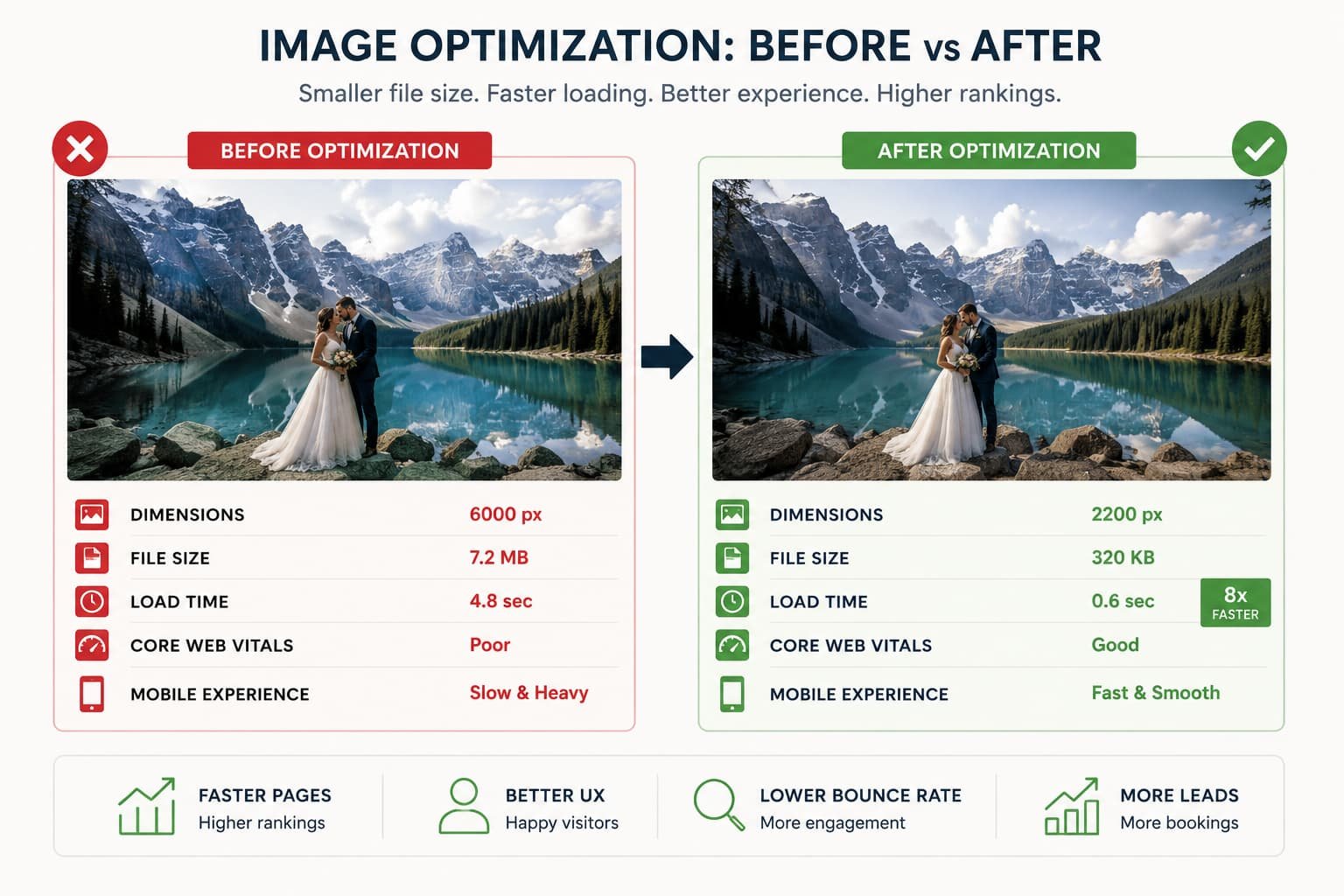
For most photographers, the biggest improvements come from image optimization.
| Optimization | Best Practice |
| Resize images | Upload images at the maximum display size, not full camera resolution. |
| Compression | Reduce file size using tools like ShortPixel, Imagify, or TinyPNG. |
| Modern formats | Serve images as WebP whenever possible. |
| Lazy loading | Load images only when visitors scroll to them. |
| Reduce heavy effects | Avoid unnecessary sliders, background videos, and excessive animations. |
Example:
| Before Optimization | After Optimization |
| 6000 px JPEG (7 MB) | 2200 px WebP (320 KB) |
Visitors will rarely notice any visual difference, but the page can load dramatically faster.
Hosting also matters. Reliable managed hosting, combined with a CDN (Content Delivery Network), usually delivers better performance than inexpensive shared hosting, particularly for visitors located in different regions.
Prioritize Mobile Users
Google primarily evaluates the mobile version of your website. Since most photography-related searches now happen on smartphones, mobile usability should never be an afterthought.
Review your site on multiple devices and check that:
- text remains readable without zooming;
- buttons are easy to tap;
- contact forms work properly;
- images scale correctly;
- important information appears before excessive scrolling.
Do not rely only on your desktop monitor. A homepage that looks beautiful on a large screen may be frustrating to use on a phone.
Choose the Right Website Platform
Every major website platform can rank well if the SEO fundamentals are implemented correctly. The differences mainly come down to flexibility, customization, and long-term scalability.
| Platform | Advantages | Limitations |
| WordPress | Maximum SEO control, extensive plugin ecosystem, excellent scalability. | Requires regular maintenance. |
| Showit | Excellent design flexibility with WordPress blogging. | Slightly more complex setup. |
| Squarespace | Easy to use with solid built-in SEO features. | Less technical flexibility. |
| Pixieset / Pic-Time | Excellent for client galleries. | More limited SEO capabilities for the main website. |
For photographers planning to invest seriously in SEO over the coming years, WordPress generally provides the greatest flexibility. However, platform choice alone will not determine rankings. High-quality content, good technical performance, and strong authority remain far more important.
Step 4: Perform Keyword Research That Matches Real Client Searches
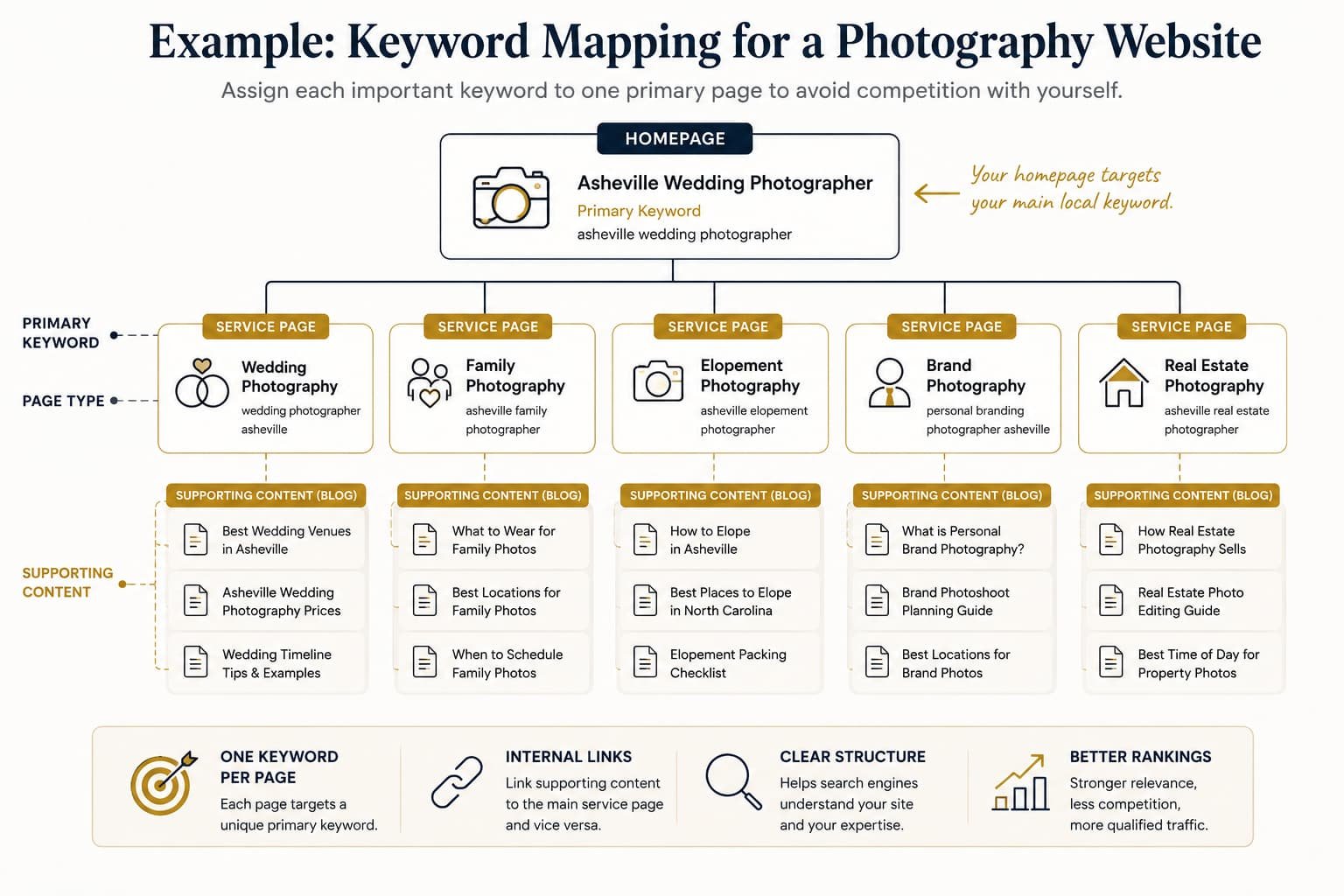
Keyword research identifies the searches your ideal clients perform before booking a photographer. The goal is not to target the highest-volume keywords, but the searches most likely to generate qualified inquiries.
Start With Your Client Journey
Most photographers already know the questions clients ask before booking. Those questions are often excellent keyword opportunities.
| Client Stage | Typical Searches |
| Research | Best places to elope in Colorado |
| Planning | How much does wedding photography cost? |
| Comparing | Documentary vs traditional wedding photography |
| Booking | Denver wedding photographer |
Instead of brainstorming topics randomly, begin with the questions clients repeatedly ask during consultations, emails, or discovery calls.
Examples include:
- When should we book?
- What should we wear?
- How long does a session last?
- Which locations do you recommend?
- What happens if it rains?
Every recurring question can become a valuable piece of content.
Expand Your Keyword List
Google itself provides several excellent free research sources.
- Google Autocomplete
- People Also Ask
- Related Searches
These features reveal actual searches rather than guesses.
You can also use dedicated keyword research tools.
| Tool | Best For |
| Keywords Everywhere | Quick keyword ideas inside Google. |
| AnswerThePublic | Question-based content ideas. |
| Ubersuggest | Affordable keyword research. |
| Google Keyword Planner | Google search volume estimates. |
| KWFinder | Finding low-competition keywords. |
| Ahrefs / Semrush | Advanced competitor and keyword research. |
Understand Search Intent
Ranking is not just about keywords. Google also evaluates search intent, or what the user actually wants.
| Intent | Example | Best Page Type |
| Informational | What should I wear for family photos? | Blog article |
| Commercial | Best wedding photographer in Denver | Comparison or service page |
| Transactional | Denver wedding photographer | Service page |
| Navigational | John Smith Photography | Homepage |
Matching search intent is often more important than repeating keywords.
Prioritize the Right Keywords
A common mistake is targeting broad, highly competitive keywords too early.
Instead, prioritize:
- location-based keywords;
- long-tail searches;
- low-competition opportunities;
- high commercial intent.
Example:
| Less Realistic | More Achievable |
| Wedding Photographer | Documentary Wedding Photographer Asheville |
| Family Photography | Fall Family Photographer Denver |
| Elopement Photographer | Yosemite Elopement Photographer |
Long-tail keywords usually have lower search volume, but they are often easier to rank for and convert better because the searcher’s intent is much more specific.
The final result of keyword research should be a simple content map in which each important keyword has a single primary destination page. This prevents future keyword cannibalization and gives every page a clear SEO purpose.
Step 5: Optimize Your Most Important Pages
Your homepage, service pages, portfolio, pricing, about, and contact pages are the foundation of your SEO strategy. These are the pages most likely to generate inquiries, so each should target a specific search intent and a clearly defined primary keyword.
Optimize Your Homepage
Your homepage usually carries the strongest authority on your website, making it the best place to target your primary local keyword.
For most photographers, that keyword combines a service with a location.
Examples include:
- Asheville Wedding Photographer
- Denver Family Photographer
- Chicago Corporate Headshots
- Portland Documentary Wedding Photographer
If you work in a highly competitive market, consider targeting a more specific niche or service area before expanding to broader keywords.
Example:
| Too Competitive | More Targeted |
| New York Wedding Photographer | Brooklyn Documentary Wedding Photographer |
| London Photographer | London Personal Branding Photographer |
Every homepage should include the following on-page elements.
| Element | Recommendation |
| Title Tag | Include the primary keyword naturally. |
| H1 | One descriptive headline reflecting the page topic. |
| Introductory copy | Explain who you help, what you photograph, and where you work. |
| Testimonials | Reinforce trust with real client reviews. |
| Internal links | Link to your most important service pages. |
Good Title Tag
Asheville Wedding Photographer | Emily Carter Photography
Poor Title Tag
Home
Another weak example
Welcome to My Photography Website
Google and potential clients should immediately understand what you offer.
Create Dedicated Service Pages
Each major photography service deserves its own page.
Instead of creating one page that briefly lists every service, develop separate pages targeting distinct search intents.
Examples:
- Wedding Photography
- Family Photography
- Brand Photography
- Newborn Photography
- Corporate Headshots
- Real Estate Photography
Each page should answer the questions prospective clients ask before booking.
Consider including:
- what the service includes;
- who it is for;
- your process;
- sample galleries;
- frequently asked questions;
- pricing guidance;
- client testimonials.
Service pages should focus on helping potential clients make a decision rather than simply describing your business.
Should You Display Pricing?
Many photographers hesitate to publish pricing, but pricing-related searches often indicate strong buying intent.
You do not necessarily need to publish every package, but providing starting prices or investment ranges helps visitors determine whether your services fit their budget.
Example:
Wedding Collections starting at $3,200
or
Most couples invest between $3,000 and $5,000.
This also allows your pages to rank for searches related to photography pricing.
Optimize Your About Page
The About page is often overlooked from an SEO perspective, yet it plays an important role in demonstrating experience and trust.
Rather than telling your entire life story, focus on information that helps potential clients understand why they should hire you.
Include:
- years of experience;
- specializations;
- photography philosophy;
- professional awards or publications;
- areas served;
- behind-the-scenes photographs;
- links to featured work.
Google increasingly rewards genuine first-hand experience, making authentic content considerably more valuable than generic marketing copy.
Optimize Portfolio Pages
Your portfolio is your strongest sales asset, but it also contributes to SEO when properly optimized.
Instead of uploading images without context, provide enough supporting text for search engines to understand what visitors are viewing.
Weak example
Gallery 12
Better example
Spring Wedding at Biltmore Estate in Asheville
Well-written introductions, descriptive headings, and optimized image alt text help both users and search engines understand your work.
Avoid indexing dozens of near-identical client galleries. Reserve indexable portfolio pages for your strongest work or galleries targeting specific venues or locations.
Optimize Your Contact Page
Your contact page should make it as easy as possible for visitors to reach you.
Include:
- contact form;
- email address;
- phone number (if appropriate);
- service area;
- Google Business Profile information;
- links to relevant social platforms.
If you primarily work in a specific city or region, reinforce that location naturally within the page copy.
Essential On-Page SEO Elements
Every important page should include the same technical foundations.
| Element | Best Practice |
| Title Tag | Primary keyword near the beginning. |
| Meta Description | Compelling summary encouraging clicks. |
| URL | Short, descriptive, and readable. |
| H1 | One primary heading. |
| Heading Structure | Logical H2 and H3 hierarchy. |
| Internal Links | Connect related pages naturally. |
| Image Alt Text | Describe the image accurately. |
Good URL
yourdomain.com/asheville-wedding-photographer
Poor URL
yourdomain.com/page?id=274
Good Alt Text
Bride and groom exchanging vows at Biltmore Estate wedding in Asheville.
Poor Alt Text
IMG_4938.jpg
Finally, consider implementing structured data such as LocalBusiness, FAQPage, and ImageObject schema. While schema alone will not improve rankings, it helps search engines understand your content and may increase your visibility through enhanced search results.
Once your core pages are fully optimized, your website has a solid foundation for attracting high-intent local traffic. The next step is creating content that expands your reach beyond your primary service pages.
Step 6: Create Content That Brings in Qualified Clients
Optimized service pages target people who are ready to hire. Content marketing expands your visibility by attracting potential clients much earlier in their decision-making process.
A useful blog also strengthens topical authority, creates internal linking opportunities, attracts backlinks, and gives Google more reasons to consider your website an expert resource.
Choose Topics Your Clients Actually Search For
Every article should answer a real search query or client question. Instead of publishing every recent session, prioritize content with long-term search value.
High-performing topics often include:
| Topic Type | Examples |
| Venue Guides | Best Wedding Venues in Asheville |
| Location Guides | How to Elope in Yosemite |
| Pricing | How Much Does Wedding Photography Cost? |
| Planning | What to Wear for Family Photos |
| Comparisons | Elopement vs Traditional Wedding |
| Preparation | Newborn Photography Checklist |
Notice that these topics solve problems rather than simply showcase completed sessions.
A wedding gallery may attract occasional searches, while a well-written venue guide can generate qualified traffic for years.
Study the Existing Search Results
Before writing, search your target keyword and examine the pages already ranking on Google’s first page.
Ask yourself:
- What questions do they answer?
- What information is missing?
- Can I provide better examples?
- Can I include original photography?
- Can I offer practical advice from personal experience?
The goal is not to copy competing articles. It is to create something more complete, more useful, and more trustworthy.
This is where photographers have a significant advantage over AI-generated content.
Only you can explain things like:
- where the best sunset light appears at a venue;
- which ceremony locations become crowded;
- how weather affects portraits;
- backup plans you’ve used successfully;
- real timelines that work.
These first-hand insights strengthen Experience, one of Google’s E-E-A-T signals, while making your content genuinely more valuable for readers.
A Simple Structure That Works
Most educational articles follow a similar framework.
| Section | Purpose |
| Introduction | Confirm the reader is in the right place. |
| Main Sections | Answer the primary topic step by step. |
| Examples | Add practical advice and original experience. |
| FAQ | Answer related long-tail questions. |
| Conclusion | Summarize and encourage the next action. |
Instead of writing to reach a specific word count, focus on covering the topic completely. If competitors answer six important questions and you answer ten, your content is usually more useful regardless of length.
Use Original Images Strategically
Photography websites already possess one of the strongest competitive advantages in SEO: original visual content.
Whenever possible:
- use photographs from actual sessions;
- add descriptive captions;
- optimize alt text;
- compress images before uploading;
- group related images logically.
Google Image Search can become an additional traffic source, particularly for venue guides, destination weddings, portrait locations, and educational content.
Example image caption
Sunset portraits captured behind the Biltmore Estate conservatory during an autumn wedding.
This provides useful context for visitors while helping search engines understand the image.
Strengthen Every Article Before Publishing
Before publishing, review the page using a simple checklist.
| Checklist | Completed? |
| Primary keyword in Title Tag | ✓ |
| Compelling Meta Description | ✓ |
| One H1 heading | ✓ |
| Logical H2/H3 structure | ✓ |
| Optimized images | ✓ |
| Internal links | ✓ |
| External references where appropriate | ✓ |
| Clear call-to-action | ✓ |
Publishing should never be the final step. Share new content through your social media channels, newsletter, Pinterest, or partner vendors to generate early visibility and encourage natural backlinks.
Refresh Your Best Content
SEO content should be treated as a long-term asset rather than a one-time project.
At least once each year, review your highest-performing pages and update them by:
- adding recent photographs;
- refreshing outdated information;
- answering new client questions;
- improving internal links;
- expanding sections that competitors now cover better.
Refreshing an established article is often faster and more effective than creating an entirely new one.
A collection of useful, regularly updated articles gradually builds topical authority across your niche, making it easier for both new and existing pages to rank.
Step 7: Build Authority Through Links
Even excellent content benefits from authority signals. One of the strongest remains high-quality links, both from other websites and between pages on your own site.
Earn Valuable Backlinks
A backlink is simply another website linking to yours.
Google treats relevant editorial links as recommendations. However, quality is far more important than quantity.
One link from a respected local venue or wedding publication is generally worth far more than dozens of low-quality directory links.
Some of the most effective backlink opportunities for photographers include:
| Source | Opportunity |
| Wedding venues | Preferred vendor listings |
| Wedding planners | Vendor collaborations |
| Florists and decorators | Styled shoots |
| Wedding publications | Featured weddings |
| Local news websites | Community events and interviews |
| Photography blogs | Guest articles and expert contributions |
The most sustainable strategy is to create content people naturally want to reference rather than purchasing backlinks or participating in questionable link schemes.
A comprehensive venue guide, planning checklist, or destination wedding resource is much more likely to earn natural links than a generic gallery page.
Strengthen Internal Linking
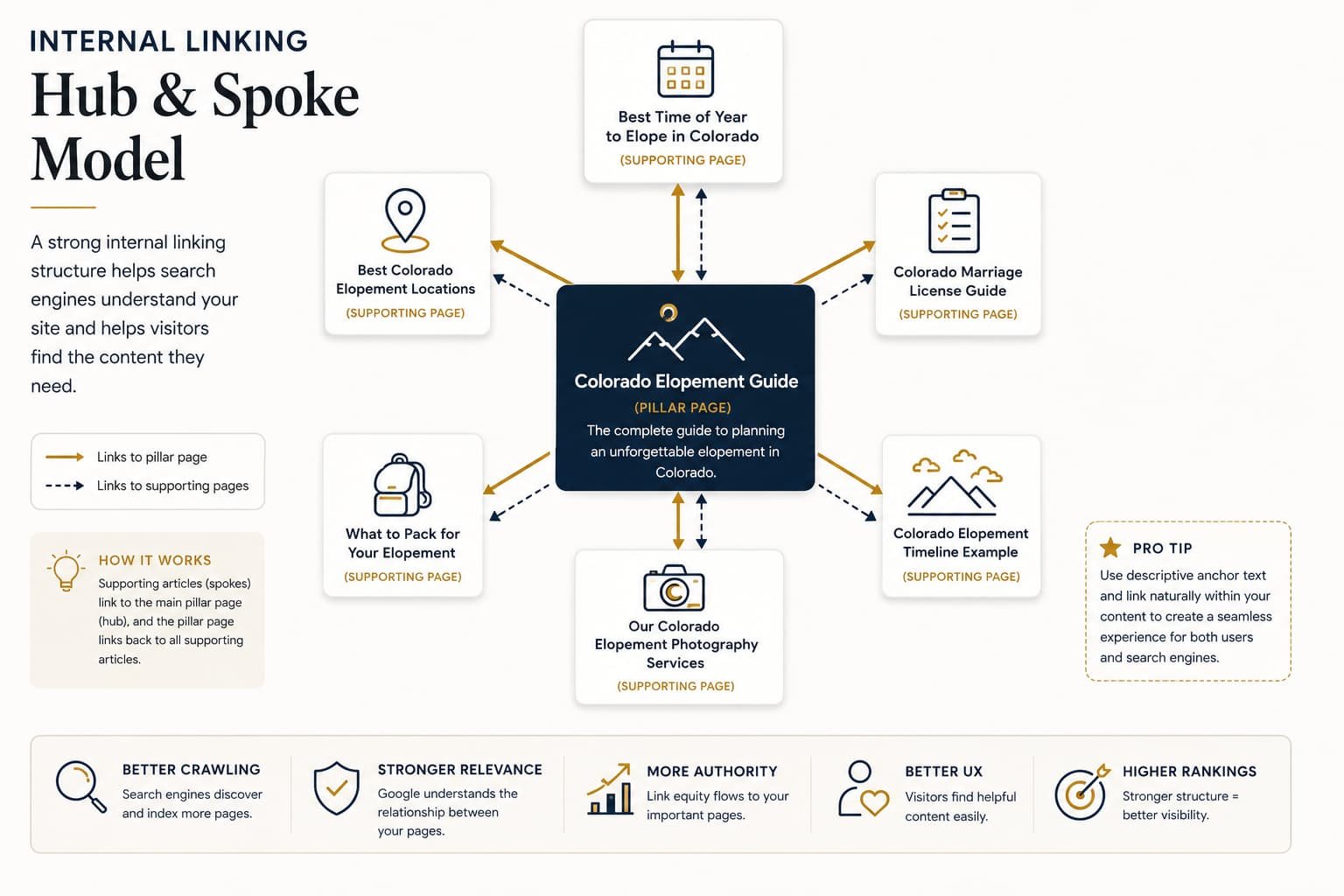
They help search engines discover pages, distribute authority throughout your website, and guide visitors toward your most valuable content.
A simple topic cluster might look like this:
│Colorado Elopement Guide
├── Best Colorado Elopement Locations
├── Colorado Marriage License Guide
├── What to Pack for Your Elopement
Internal links are completely under your control and are often overlooked.
├── Best Time of Year to Elope
└── Colorado Elopement Photography Services
Each supporting article links back to the main guide, while the guide links to every supporting resource.
This creates a clear topical structure that benefits both users and search engines.
Whenever you publish a new article, ask yourself:
- Which existing pages should link to it?
- Which older articles can it reference?
- Can it naturally link to a service page?
Descriptive anchor text also helps.
Better
See our complete guide to Yosemite elopements.
Avoid
Click here.
As your website grows, a thoughtful internal linking strategy becomes increasingly valuable. It helps Google understand the relationships between your pages while encouraging visitors to explore more of your content before contacting you.
Step 8: Measure, Improve, and Repeat
SEO is not a one-time project. The websites that consistently attract leads are the ones that regularly review performance, improve existing content, and build on what already works.
This process begins with data rather than assumptions.
Monitor Performance in Google Search Console
Google Search Console should become part of your monthly SEO routine.
Instead of checking rankings for a few keywords, focus on the pages and queries generating real opportunities.
| Metric | Why It Matters |
| Impressions | Shows how often your pages appear in search. |
| Clicks | Measures actual traffic from Google. |
| CTR | Helps identify weak titles or meta descriptions. |
| Average Position | Shows whether rankings improve over time. |
| Top Queries | Reveals new keyword opportunities. |
Search Console often uncovers opportunities you were not intentionally targeting.
Example
Your article about wedding venues might unexpectedly receive impressions for:
best outdoor wedding ceremony locations in Asheville
If that query generates impressions but few clicks, it may deserve its own dedicated article or an expanded section within the existing guide.
Combine Search Console With GA4
Google Analytics 4 complements Search Console by showing what visitors do after they arrive.
Together, the two platforms answer different questions.
| Google Search Console | Google Analytics 4 |
| How people find your website | What visitors do after arriving |
| Search queries | User engagement |
| Organic impressions | Conversions |
| Average rankings | Lead generation |
For photographers, GA4 becomes especially valuable when conversion tracking is configured.
Track actions such as:
- contact form submissions;
- pricing guide downloads;
- phone number clicks;
- email clicks;
- consultation bookings.
Traffic alone does not pay the bills. Qualified inquiries do.
Create a Simple Monthly SEO Review
You do not need complicated reports.
Review these questions once each month.
| Question | Action |
| Which pages gained traffic? | Create similar content. |
| Which pages lost traffic? | Refresh and improve them. |
| Which keywords moved to page two? | Strengthen internal links and update content. |
| Which pages receive impressions but few clicks? | Rewrite titles and meta descriptions. |
| Which pages generate inquiries? | Expand those topics further. |
This review usually takes less than an hour but provides a clear roadmap for future SEO work.
Refresh Existing Content
Older content gradually loses relevance as competitors publish newer resources.
Instead of continually creating new articles, regularly improve the pages that already have authority.
Typical updates include:
- adding recent portfolio images;
- refreshing statistics or pricing information;
- expanding sections with new questions;
- improving internal links;
- updating venue recommendations;
- adding new client examples.
Refreshing a strong article often produces faster results than publishing another article targeting a completely new keyword.
Improve or Consolidate Weak Content
As your website grows, some pages will inevitably overlap or stop performing.
Review them periodically and decide whether to:
| If the Page… | Recommended Action |
| Still receives traffic | Improve it. |
| Overlaps another page | Merge and redirect. |
| No longer serves a purpose | Remove it and redirect the URL. |
| Supports users but not search | Keep it with noindex. |
Maintaining a smaller collection of high-quality pages is usually more effective than leaving hundreds of outdated articles indexed.
Expand Winning Topics
Whenever a topic performs well, build additional content around it.
Example
If your article about Yosemite elopements consistently generates inquiries, consider creating supporting resources such as:
- Best Yosemite Ceremony Locations
- Yosemite Wedding Timeline
- Yosemite Permit Guide
- Best Time of Year to Elope in Yosemite
- What to Wear for a Yosemite Elopement
This topic-cluster approach strengthens topical authority while creating valuable internal linking opportunities.
Focus on Business Metrics
Rankings and traffic are useful indicators, but they are not the ultimate objective.
Measure success using the metrics that directly affect your business.
| Less Meaningful | More Meaningful |
| Page views | Qualified inquiries |
| Keyword count | Consultation requests |
| Total impressions | Booked sessions |
| Organic traffic | Revenue generated |
A page that attracts 100 highly qualified visitors who regularly become clients is significantly more valuable than one that attracts 10,000 visitors with no intention of booking.
Successful SEO is measured by business growth, not vanity metrics.
Part 3: Frequently Asked Questions
Can I Do SEO Myself?
Yes. Most photographers can successfully manage the fundamentals themselves, especially during the early stages of their business.
The biggest investment is time rather than money.
Learning how search works, optimizing your core pages, writing helpful content, and tracking performance are all skills that improve with practice.
Understanding SEO also makes it much easier to evaluate agencies or freelancers if you later decide to outsource part of the work.
Should I Hire an SEO Professional?
If SEO becomes an important lead generation channel and your schedule no longer allows you to manage it consistently, hiring professional help can accelerate growth.
However, choose carefully.
Avoid providers who:
- guarantee #1 rankings;
- sell large quantities of backlinks;
- cannot explain their strategy clearly;
- promise overnight results.
Look instead for professionals who focus on technical improvements, content quality, local SEO, and long-term growth.
Many photographers achieve excellent results using a hybrid approach: they define the strategy themselves while outsourcing technical work or content production.
How Much Does SEO Cost?
Doing SEO yourself requires relatively little financial investment.
Most photographers already pay for:
- hosting;
- a domain;
- an SEO plugin;
- image optimization tools.
Premium keyword research software or SEO services increase costs but can save considerable time.
The important distinction is that SEO builds a long-term marketing asset, while paid advertising only produces results while campaigns remain active.
Has AI Changed SEO?
Yes-but it has not replaced it.
AI Overviews, ChatGPT, Perplexity, and other AI-powered search experiences increasingly summarize information before users visit websites.
This makes high-quality content even more important.
Pages that demonstrate genuine experience, answer questions clearly, and provide original insights are more likely to be referenced by both traditional search engines and AI-powered systems.
Many marketers now refer to this broader approach as Generative Engine Optimization (GEO) or Answer Engine Optimization (AEO).
The underlying principles remain largely the same:
- publish authoritative content;
- answer real questions;
- demonstrate first-hand experience;
- structure information clearly;
- build topical authority over time.
Photography is particularly well positioned because AI cannot replace your portfolio, your client experience, or your local knowledge.
How Long Does SEO Take?
SEO is a long-term investment rather than a quick marketing tactic.
The timeline depends on several factors, including your market, competition, website authority, and how consistently you publish and improve content.
| Website Type | Typical Timeline* |
| New website | 6–12+ months |
| Established local business | 3–6 months |
| Low-competition local keywords | 2–4 months |
| Highly competitive markets | 12 months or longer |
*Actual results vary depending on competition, content quality, technical health, and backlink profile.
The important point is consistency. Publishing useful content, improving existing pages, earning quality backlinks, and monitoring performance month after month produces compounding results that paid advertising cannot match.
Does SEO Work for Every Photography Niche?
Absolutely.
Although this guide uses many wedding photography examples, the same principles apply to virtually every photography specialty.
| Niche | Example Keywords |
| Wedding | Asheville wedding photographer |
| Family | Fall family photographer Denver |
| Newborn | When should I book newborn photos? |
| Maternity | Maternity photographer Chicago |
| Brand Photography | Personal branding photographer Austin |
| Corporate Headshots | Corporate headshots Boston |
| Real Estate | Real estate photographer Phoenix |
| Product Photography | Amazon product photographer |
Only the keywords change. The overall SEO strategy remains the same:
- understand what your audience searches for;
- optimize your service pages;
- publish genuinely useful content;
- demonstrate real experience;
- build authority over time.
Conclusion
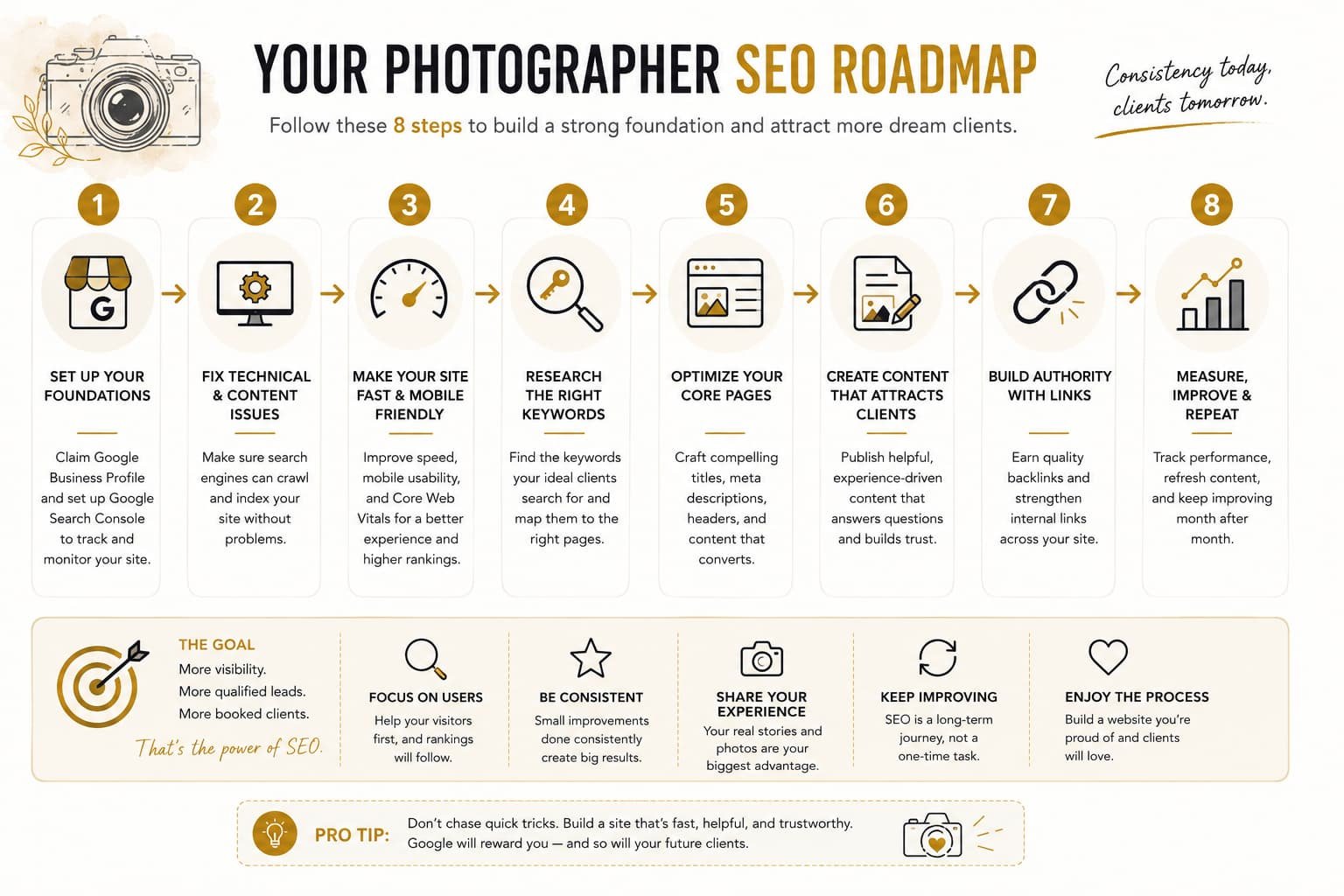
SEO for photographers is not about finding shortcuts or gaming Google’s algorithm. It is about building a website that genuinely helps potential clients while making it easy for search engines to understand what you offer.
The strategy can be summarized in eight practical steps:
- Set up Google Business Profile and Google Search Console.
- Fix technical and content issues that limit visibility.
- Improve website speed and mobile usability.
- Research the keywords your clients actually search for.
- Optimize your core service pages.
- Create helpful, experience-driven content.
- Strengthen authority with quality backlinks and internal links.
- Measure performance and continuously improve.
Whenever you evaluate a new SEO tactic, ask yourself three questions:
- Does it improve relevance?
- Does it strengthen authority?
- Does it create a better user experience?
If the answer is yes, it is probably worth doing.
One advantage sets photographers apart from many other businesses: you already possess the experience, original images, and client knowledge that search engines increasingly reward. No AI tool or generic content writer can replicate years of photographing real weddings, families, portraits, or commercial projects.
Use that experience to create genuinely helpful resources, improve them consistently, and let your website become more valuable over time. While SEO requires patience, it can become one of the most dependable and cost-effective sources of qualified inquiries for your photography business.
Sources and Further Reading
- Google Search Central – How Search Works
- Google SEO Starter Guide
- Google Search Quality Rater Guidelines (E-E-A-T)
- Google Business Profile Help Center
- Google Search Console Help
- Core Web Vitals Documentation
- Google PageSpeed Insights
- Backlinko – Google Organic CTR Study
- The Knot – Wedding Industry Research
- Google Search Central – AI Features in Search