If you own a local business, you’ve probably been told that better Local SEO starts with buying the right software. While tools can save time and uncover opportunities, they won’t improve your rankings on their own. A perfectly optimized dashboard means very little if your Google Business Profile is outdated, your website is slow, or customers stop leaving reviews.
Imagine John, who runs a family plumbing business with two technicians. He spends hundreds of dollars on a premium SEO platform because it promises better rankings. Six months later, his visibility hasn’t improved much, not because the software failed, but because his Google Business Profile still lists old opening hours and half of his business citations contain outdated phone numbers. Nobody has replied to customer reviews in months. This scenario is far more common than most software vendors would like to admit.
The right Local SEO tools don’t replace good marketing. They make it easier to perform the tasks that actually influence local visibility. Whether that’s monitoring rankings across different neighborhoods, keeping business listings consistent, managing reviews, or identifying technical issues before they affect customers, every tool has a specific purpose.
This guide breaks down the best Local SEO tools in 2026, explains where each one excels, highlights its limitations, and helps you decide which combination makes sense based on your business size, budget, and goals.
Pricing and features are accurate as of mid-2026, but are subject to change regularly. Always verify current plans and functionality on the vendor’s official website before making a purchasing decision.
What Do Local SEO Tools Actually Help You Do?
Most Local SEO software falls into one or more of these categories:
- Track local rankings: Measure how your business appears in Google’s local pack and organic search, often across different areas of a city instead of from a single location.
- Manage your Google Business Profile (GBP): Schedule posts, update business information, monitor reviews, and manage multiple locations more efficiently.
- Build and maintain citations: Keep your business name, address, and phone number (NAP) consistent across online directories and data providers.
- Generate and manage reviews: Request customer reviews, monitor new feedback, and respond quickly across platforms such as Google, Facebook, and Yelp.
- Audit and report performance: Identify technical or Local SEO issues and track progress over time.
No single platform is the best at everything. Most successful local businesses and agencies eventually build a small toolkit rather than relying on one all-in-one solution.
Our take: Before paying for multiple subscriptions, make sure you’ve fully optimized the free tools Google already provides. Many small businesses see greater ranking improvements by maintaining an active Google Business Profile than by purchasing another SEO platform.
Pro Tip: Don’t start by subscribing to several tools at once. Identify your biggest problem first, whether it is inaccurate listings, weak review generation, poor local visibility, or technical website issues, and choose the tool that directly addresses it.
All-in-One Local SEO Platforms
BrightLocal
BrightLocal has become one of the most established Local SEO platforms for small businesses and agencies because it combines several essential tasks in a single platform. Instead of jumping between different dashboards, you can monitor rankings, manage citations, track reviews, and generate client reports from a single interface.
Its biggest strength is geo-grid rank tracking. Rather than showing only one ranking position, BrightLocal reveals how your visibility changes across different parts of a city. That’s important because local rankings can vary dramatically even within a few miles.
Other standout capabilities include:
- Geo-grid rank tracking
- Citation auditing and submission services
- Google Business Profile management
- Review monitoring
- White-label reporting for agencies
BrightLocal Features and Benefits
- Best for: Small businesses looking for one platform that covers most Local SEO activities without requiring an enterprise-level budget.
- Watch out for: BrightLocal is excellent at identifying problems, but you’ll still need to implement many of the recommended fixes yourself. Think of it as a diagnostic toolkit rather than a fully automated solution.
- Our take: If you’re managing a single business or a handful of locations, BrightLocal offers one of the best balances between functionality, usability, and price. It’s often the first paid Local SEO platform we’d recommend after you’ve outgrown Google’s free tools.
If geographic ranking visibility becomes your main priority, BrightLocal can also be paired with a specialist platform such as Local Falcon for more detailed geo-grid analysis.
Even if you don’t plan to use BrightLocal, its free Local SEO resources are well worth exploring. The library includes practical guides, industry research, checklists, and how-to articles covering topics such as Google Business Profile optimization, local rankings, citations, reviews, and reputation management. Whether you’re just getting started with Local SEO or looking to sharpen your skills, it’s one of the most useful free learning hubs available.
Whitespark
Whitespark takes a different approach. Instead of trying to be an all-in-one marketing suite, it focuses on doing a few Local SEO tasks exceptionally well.
Its Local Rank Tracker is widely respected for accuracy, while the Local Citation Finder helps uncover industry-specific and regional directories that larger platforms often overlook. Citation building is handled manually by real people rather than through fully automated systems, which usually results in higher approval rates and cleaner listings.
This makes Whitespark particularly attractive for agencies and consultants working in competitive local markets where small improvements can have a noticeable impact.
- Best for: Local SEO professionals and agencies that want highly accurate tracking and premium citation services.
- Watch out for: Most features are priced separately, so costs can increase quickly if you need rank tracking, citation management, and reputation tools together.
- Our take: If citations are a major part of your Local SEO strategy, Whitespark remains one of the strongest specialist platforms available. For many businesses, however, it works best alongside another platform rather than replacing one completely.
Don’t pay for extensive citation building simply because a tool reports that more directories are available. For most established businesses, correcting inaccurate listings and securing relevant industry or regional citations is more valuable than chasing citation volume.
Whitespark publishes the highly respected Local Search Ranking Factors study, one of the most trusted annual research reports in the Local SEO industry. The survey gathers insights from leading Local SEO experts on the factors that most affect local rankings, including Google Business Profile signals, on-page optimization, reviews, citations, backlinks, and behavioral signals. It’s an excellent resource for understanding not just which tools to use, but why certain optimization strategies matter.
Semrush Local
If you’re already using Semrush for keyword research, site audits, or competitor analysis, adding Semrush Local is a convenient way to expand into Local SEO. Instead of learning another platform, you can manage your local visibility from the same dashboard you already use for broader SEO campaigns.
The platform includes listing management, Google Business Profile auditing, Map Rank Tracker, review management, and AI Overview tracking. While it doesn’t offer the same depth as some specialist Local SEO platforms, it covers the features many businesses need without requiring an entirely separate workflow.
Some of its most useful capabilities include:
- Listing distribution across major directories
- Google Business Profile auditing and optimization
- Heatmap-style Map Rank Tracker
- AI-generated review replies
- AI Overview visibility tracking
- Automated Google Business Profile posts
Semrush Local Features and Benefits
- Best for: Businesses and agencies already invested in the Semrush ecosystem.
- Watch out for: Local SEO isn’t Semrush’s primary focus. If managing Google Business Profiles, citations, or geo-grid rankings is a major part of your business, dedicated platforms such as BrightLocal, Whitespark, or Local Falcon generally offer more advanced functionality.
- Our take: Semrush Local makes the most sense if you’re already paying for Semrush. For many small businesses, the convenience of keeping everything in one platform outweighs the additional functionality offered by specialist tools.
If you aren’t already using the broader Semrush platform, don’t assume Semrush Local is automatically the most cost-effective starting point. A combination of BrightLocal and Google’s free tools may provide better value for a business focused exclusively on local search.
If you’re new to Local SEO or want to expand your knowledge beyond the software itself, the Semrush Academy Local SEO courses are an excellent place to start. The platform offers free lessons on topics such as local keyword research, Google Business Profile optimization, citation management, reputation building, and Local SEO strategy. Whether you’re a business owner or an SEO professional, these courses provide practical guidance that complements the platform’s tools.
Geo-Grid Rank Tracking Tools
Traditional rank trackers usually tell you how your business ranks from a single location. The problem is that Google’s local results can change significantly depending on where the searcher is standing.
A dental clinic may rank first within a mile of its office but barely appear a few neighborhoods away. Geo-grid tracking helps visualize these differences by checking rankings across dozens or even hundreds of locations.
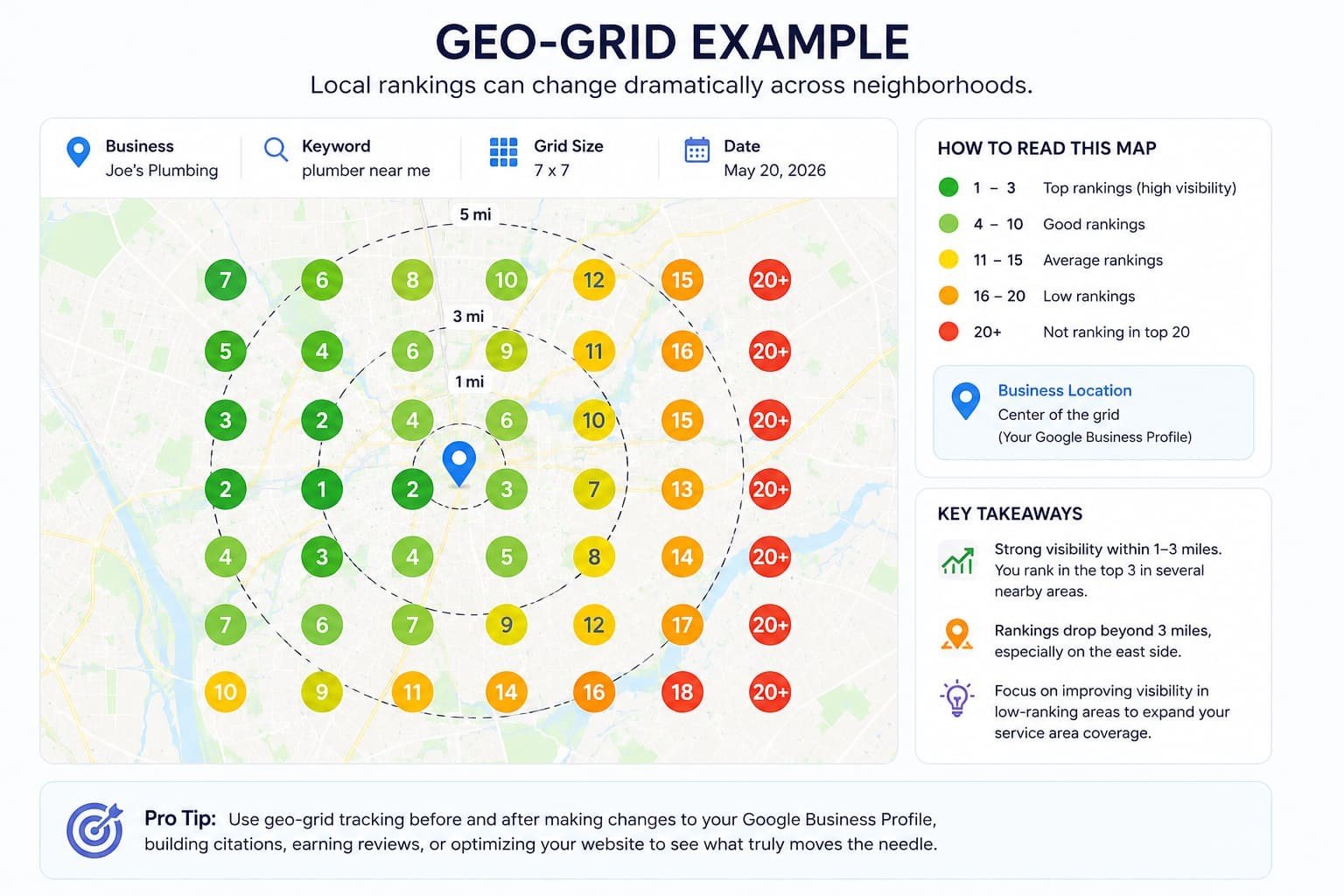
Example of a geo-grid ranking report: The business ranks highly near its physical location but gradually loses visibility farther away. Geo-grid tools help identify these gaps and measure how Local SEO improvements affect different areas of your service region.
If your business depends heavily on customers within a specific service area, geo-grid data often provides far more useful insights than a standard ranking report.
Local Falcon
Local Falcon is one of the best-known geo-grid tracking platforms available today. Rather than charging a fixed monthly fee for unlimited tracking, it uses a credit-based system that allows businesses to pay only for the scans they actually run.
The platform creates highly detailed visibility maps that show exactly where your Google Business Profile performs well and where it struggles. This makes it particularly useful after optimizing a profile, earning new reviews, changing business categories, or testing other Local SEO improvements.
It has also expanded beyond traditional Google Maps tracking by introducing visibility reporting for AI-generated search experiences, including Google AI Overviews and ChatGPT citations.
- Best for: Businesses and agencies that want highly detailed geographic ranking data without committing to expensive monthly plans.
- Watch out for: Local Falcon focuses on measuring visibility, not managing every aspect of Local SEO. Most users pair it with another platform for citation management, review monitoring, or Google Business Profile optimization.
- Our take: If you’re trying to understand where you’re losing visibility, not just whether you’ve gained or lost rankings, Local Falcon is one of the most valuable specialist tools available.
Local Falcon works particularly well alongside an all-in-one platform such as BrightLocal. BrightLocal can help manage the broader Local SEO workflow, while Local Falcon provides more detailed geographic visibility data.
Pro Tip: Don’t run geo-grid scans every day without a clear reason. Use them before and after meaningful changes, such as updating your primary category, improving landing pages, earning a significant number of reviews, or completing a citation cleanup. This makes the data easier to interpret and helps prevent unnecessary credit usage.
Local Viking
Local Viking combines two areas that often go hand in hand: Google Business Profile management and geo-grid tracking.
Its biggest advantage is efficiency for businesses managing multiple locations. Instead of updating each profile individually, you can publish posts, adjust business hours, monitor reviews, and schedule updates across dozens of locations from a single dashboard.
Geo-grid tracking is tightly integrated into those management features, making it easier to measure whether your optimization work actually improves local visibility.
- Best for: Multi-location businesses, franchises, and agencies managing numerous Google Business Profiles.
- Watch out for: Smaller businesses with a single location may find many of its bulk-management features unnecessary.
- Our take: If your business operates several locations, the time savings alone can justify the subscription. For single-location companies, however, a simpler platform is often a better fit.
For agencies or franchises, Local Viking can replace several repetitive Google Business Profile management tasks. For a single-location business that only needs occasional updates and basic tracking, BrightLocal or Local Falcon may offer a simpler and more affordable setup.
Local Viking’s Google Business Profile Knowledge Base offers a collection of practical guides focused on Google Business Profile management. It covers topics such as profile optimization, local rankings, posting strategies, reviews, business categories, and common troubleshooting scenarios. Whether you’re managing a single location or multiple business profiles, it’s a useful free resource for improving your day-to-day Local SEO knowledge.
Nightwatch
Although Nightwatch isn’t exclusively focused on Local SEO, it has earned a strong reputation for ranking accuracy across both local and national search campaigns.
Beyond local rank tracking, it integrates with Google Analytics and Google Search Console, making it easier to connect ranking changes with actual traffic and conversions. Automated reports and flexible segmentation also make it popular among agencies.
- Best for: SEO professionals and agencies managing both traditional SEO and Local SEO campaigns.
- Watch out for: Nightwatch doesn’t include citation management or Google Business Profile tools, so you’ll likely need additional software for a complete Local SEO workflow.
- Our take: If ranking data is your highest priority, Nightwatch remains one of the strongest tracking platforms available. Just don’t expect it to replace dedicated Local SEO management tools.
Nightwatch is especially useful when Local SEO is only one part of a broader organic search campaign. If your main concern is visibility inside Google Maps, however, a dedicated geo-grid tool such as Local Falcon will usually provide more actionable geographic data.
Pro Tip: Avoid treating ranking changes as the final measure of success. Connect them with Google Search Console, Google Analytics 4, calls, form submissions, bookings, and revenue whenever possible. A higher ranking has limited business value if it does not generate qualified leads or customers.
Listing and Citation Management Tools
Keeping your business information consistent across the web might not be the most exciting part of Local SEO, but it remains one of the foundations of a trustworthy online presence. When Google finds conflicting business names, addresses, phone numbers, or opening hours across directories, it becomes harder to determine which information is correct.
Citation management tools help solve that problem by updating multiple directories from a central location and identifying duplicate or outdated listings.
That said, citation building isn’t as influential as it was five or ten years ago. For most local businesses today, maintaining an accurate Google Business Profile and earning quality reviews will have a much bigger impact. Citation tools become particularly valuable after rebranding, relocating, changing phone numbers, or expanding into new markets.
A common mistake: Many businesses pay for large citation campaigns before checking whether their most important listings are accurate. Start with Google Business Profile, Apple Business Connect, Bing Places, major industry directories, and the platforms customers actually use in your market.
Yext
Yext is one of the largest enterprise listing management platforms available. It synchronizes business information across hundreds of publishers and directories, allowing companies to update their details once instead of making individual edits everywhere.
Its duplicate suppression and near real-time synchronization make it especially attractive for franchises and businesses operating dozens or even hundreds of locations.
- Best for: Enterprise businesses, franchises, and large organizations managing multiple locations.
- Watch out for: Yext follows a subscription model in which many listings remain connected to the platform. If you cancel the service, some directories may gradually revert to previously stored information. It is also significantly more expensive than tools designed for small businesses.
- Our take: Unless you’re managing a large location network, Yext is usually more platform than you actually need. Most local businesses can achieve excellent results with more affordable alternatives.
Don’t pay for enterprise-level listing distribution if you only manage one or two locations. A smaller platform or a focused manual cleanup can often solve the same core problem without creating a long-term dependency on an expensive subscription.
Pro Tip: Before signing a Yext contract, ask exactly what happens to your listings after cancellation. Understanding which updates remain permanent and which depend on the active subscription can prevent unpleasant surprises later.
Moz Local
Moz Local focuses on simplicity rather than feature depth. It distributes your business information to major directories, identifies duplicate listings, and helps keep essential business details consistent without overwhelming users with advanced functionality.
Because of its relatively accessible pricing and straightforward interface, it is often one of the first paid Local SEO tools small businesses consider after optimizing their Google Business Profile.
- Best for: Small businesses looking for an affordable way to maintain accurate business listings.
- Watch out for: Moz Local concentrates primarily on listings. It doesn’t include advanced rank tracking, geo-grid analysis, or comprehensive review management.
- Our take: If your primary goal is keeping your business information accurate across the web, Moz Local delivers good value without unnecessary complexity.
If you also need geo-grid tracking, review monitoring, or detailed reporting, Moz Local may work better as part of a broader tool stack rather than as your only Local SEO platform.
Pro Tip: Citation management is most valuable when something has changed. Prioritize it after a relocation, rebrand, phone number change, merger, or expansion into new areas. If your core listings are already accurate, additional directory distribution may produce limited returns.
Review and Reputation Management Tools
Reviews influence more than customer trust. They also play a meaningful role in Local SEO. A steady flow of genuine reviews, combined with thoughtful responses, sends strong signals that a business is active, credible, and engaged with its customers.
Many business owners spend hours monitoring rankings while replying to customer reviews only occasionally. In reality, consistently responding to reviews often has a greater impact on attracting new customers than checking ranking reports every day.
Common Mistake: Don’t focus only on review quantity. A sudden burst of generic reviews followed by months of inactivity can look less natural than a steady stream of detailed feedback from real customers.
Podium
Podium specializes in helping businesses generate more customer reviews through SMS-based follow-ups and centralized customer communication.
After a completed job or appointment, businesses can automatically send review requests via text message, making it easier for satisfied customers to leave feedback while the experience is still fresh.
The platform also combines messaging, customer communication, and payment features into a single inbox, making it particularly attractive for service-based businesses.
- Best for: Local service businesses where reputation directly influences new bookings.
- Watch out for: Podium focuses on customer communication rather than technical Local SEO. You’ll still need other tools for rank tracking, citation management, and Google Business Profile optimization.
- Our take: If positive reviews consistently generate new business for you, investing in review generation often produces a better return than purchasing another SEO reporting platform.
Podium works best when review requests are built into a clear customer follow-up process. If your team doesn’t consistently collect customer contact details or complete jobs inside a structured workflow, much of the platform’s automation potential may go unused.
If generating more Google reviews is one of your priorities, Podium’s Google Review Link Generator is a useful free resource. It helps you quickly create a direct review link for your Google Business Profile, making it easier for satisfied customers to leave feedback with fewer clicks. The page also includes practical tips on sharing your review link and encouraging more genuine customer reviews.
Birdeye
Birdeye approaches reputation management at a larger scale. It monitors reviews across hundreds of websites and automates review requests via email, SMS, and other communication channels.
For businesses managing multiple locations, its centralized dashboard makes it much easier to monitor customer sentiment without logging into multiple platforms every day.
AI-assisted review responses and business listing management further reduce the amount of manual work required.
- Best for: Multi-location businesses and organizations with dedicated customer experience teams.
- Watch out for: Birdeye’s pricing reflects its enterprise focus, making it difficult to justify for many small local businesses.
- Our take: Unless you’re managing several locations with high review volume, you’ll probably benefit more from a simpler and significantly cheaper solution.
Birdeye makes the most sense when review management is part of a broader customer experience operation. If you only need basic review requests and notifications for one location, Podium or a lighter review platform may be more practical.
Pro Tip: Automating review responses can save time, but avoid publishing generic AI-generated replies without review. Customers can quickly recognize repetitive responses, and poorly handled negative feedback can damage trust.
Helpful Tools Beyond Traditional Local SEO
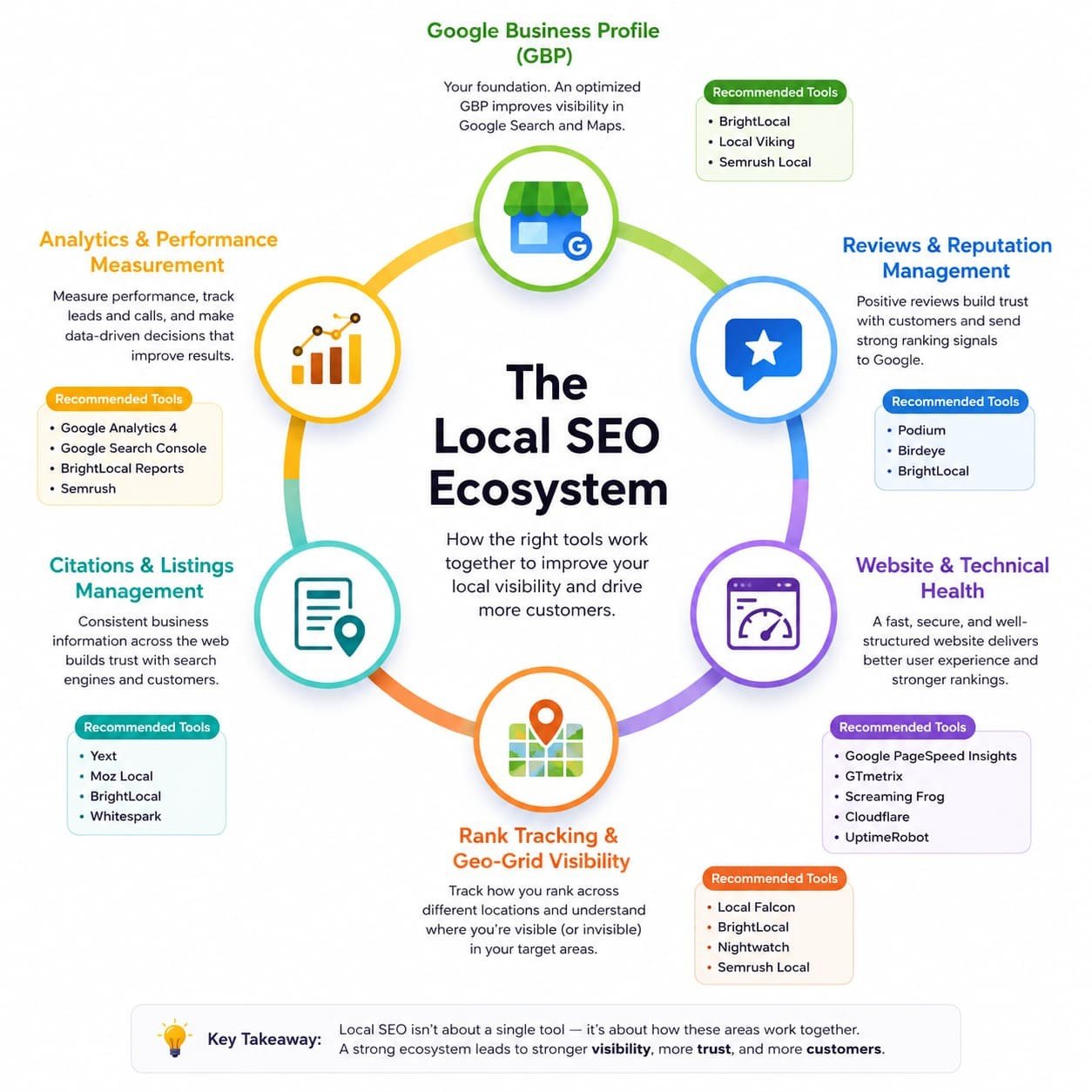
Not every tool that improves Local SEO was actually built for Local SEO.
Some of the most valuable additions to your toolkit help keep your website healthy, available, and technically reliable. These factors indirectly influence both search visibility and customer experience.
These aren’t traditional Local SEO platforms, but they solve technical problems that can directly affect rankings, user experience, and lead generation.
Here are a few worth considering:
| Tool | Why It Matters |
| UptimeRobot | Alerts you if your website goes offline, helping you fix downtime before customers or search engines are affected. |
| Better Stack | Provides website uptime monitoring, incident management, and detailed performance alerts. |
| Google PageSpeed Insights | Identifies Core Web Vitals and performance issues that may affect user experience. |
| GTmetrix | Provides detailed page speed diagnostics beyond Google’s own reports. |
| Cloudflare Analytics | Offers visibility into traffic, caching, security events, and overall website health. |
| Screaming Frog SEO Spider | Helps identify broken pages, redirects, missing metadata, crawl issues, and internal linking problems. It is particularly useful for agencies and advanced users. |
Our take: Local SEO isn’t just about rankings in Google Maps. If your website goes offline for an entire weekend or important landing pages become inaccessible, no amount of citation building or review management will compensate for that. A well-rounded toolkit protects both your visibility and your business.
Pro Tip: Before investing in another Local SEO platform, make sure you’re already using Google Search Console, Google Analytics 4, and Google Business Profile performance data. These free tools often reveal more actionable information than many paid platforms, yet small business owners frequently overlook them.
Choosing the Right Tool Stack
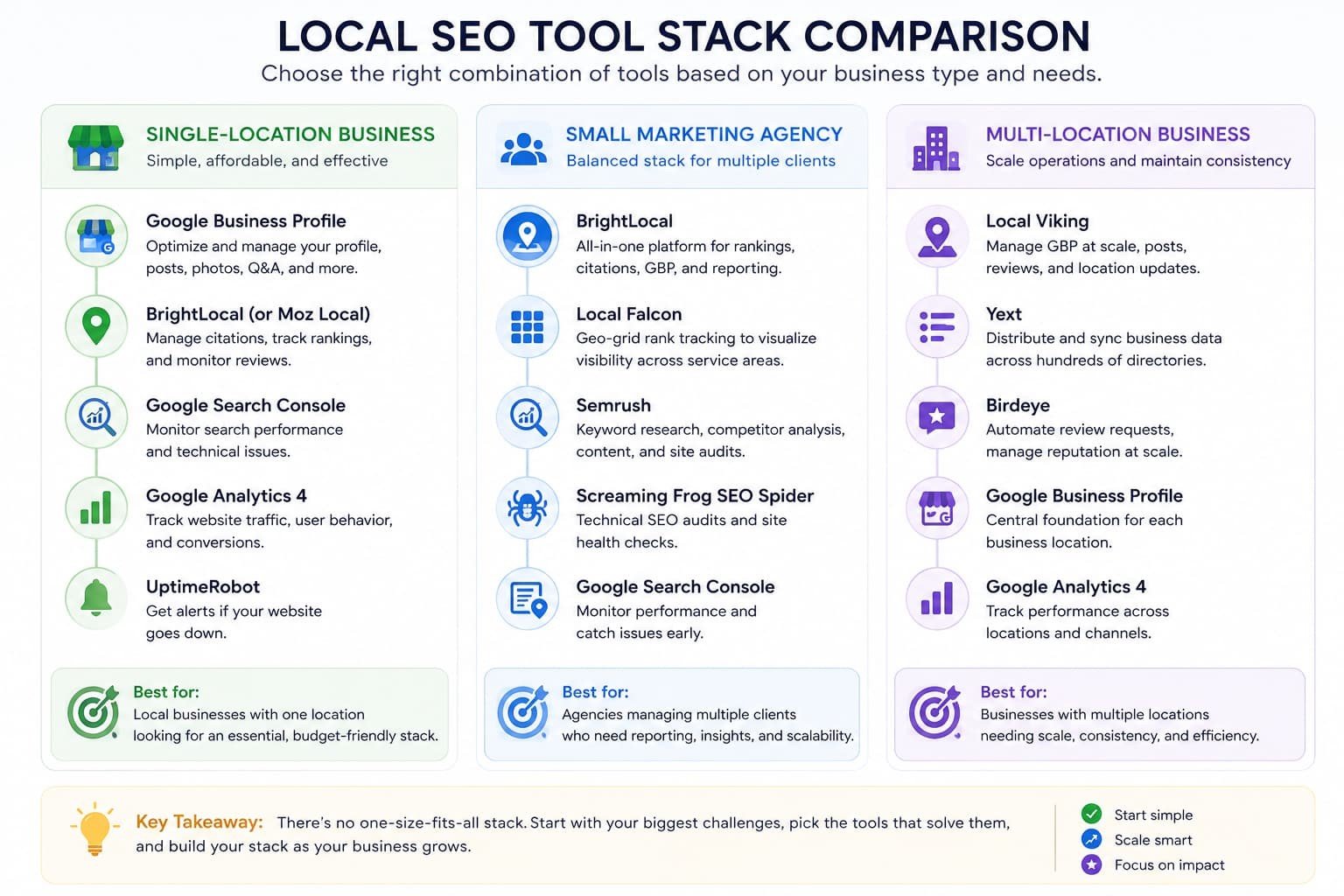
Rather than looking for a single “best” platform, think about the combination of tools that solves your biggest problems.
Single-Location Business
If you’re a plumber, dentist, restaurant owner, or another local business with one physical location, start simple:
- Google Business Profile
- BrightLocal or Moz Local
- Google Search Console
- Google Analytics 4
- UptimeRobot
This setup covers the essentials without stretching your budget.
Pro Tip: You probably don’t need five paid tools at this stage. One Local SEO platform combined with Google’s free tools is usually enough until your workflow or location count becomes more complex.
Small Marketing Agency
If you’re managing Local SEO for multiple clients, you’ll benefit from a combination of management and specialist tools:
- BrightLocal
- Local Falcon
- Semrush
- Screaming Frog
- Google Search Console
This stack provides reporting, technical SEO insights, geo-grid tracking, and competitor research without moving into enterprise pricing.
Pro Tip: Avoid subscribing to overlapping tools simply because each one offers client reporting. Choose one primary reporting platform and add specialist tools only when they provide data or functionality your main platform cannot.
Multi-Location Business
Businesses operating across several cities or regions usually require more centralized management:
- Local Viking
- Yext
- Birdeye
- Google Business Profile
- Google Analytics 4
The focus here shifts from individual optimization to maintaining consistency and operational efficiency across every location.
Pro Tip: Before adopting an enterprise platform, confirm that your team has clear ownership of listing updates, review responses, reporting, and location-level data. Expensive software cannot fix an unclear internal process.
Final Thoughts
There’s no universal “best” Local SEO tool because every business faces different challenges.
Some need better citation management after a rebrand. Others need to improve review generation, monitor rankings across service areas, or simply keep multiple Google Business Profiles organized.
The businesses that consistently perform well in local search aren’t necessarily using the most expensive software. They’re the ones following proven fundamentals: maintaining an accurate Google Business Profile, earning genuine customer reviews, keeping business information consistent, and ensuring their website remains fast, reliable, and available.
Choose tools that help you complete those tasks more efficiently, not ones that simply generate more reports.
The best Local SEO software doesn’t replace good marketing. It helps you spend less time managing spreadsheets and more time serving customers.
The businesses that consistently outperform local competitors aren’t usually the ones with the biggest software budgets. They’re the ones that execute the fundamentals more consistently.